ArdSaor Atlassian app

Access Evidence for Jira

Run Jira access reviews with remediation tracking and auditor-ready evidence packs.

Access Evidence helps administrators launch scoped access reviews, assign reviewers, record decisions, track remediation status, and export evidence packs with integrity details. It is designed for teams that need repeatable access review workflows and audit support inside Atlassian.

Product summary

Access Evidence helps administrators launch scoped access reviews, assign reviewers, record decisions, track remediation status, and export evidence packs with integrity details. It is designed for teams that need repeatable access review workflows and audit support inside Atlassian.

Best for: Admins, security teams, and control owners that need access review evidence and follow-up tracking.

Not for: Automatic permission changes without reviewer action or a broad identity governance replacement.

Helpful short answer

Access Evidence is an ArdSaor app for Access reviews and audit evidence. It works with Jira Cloud; review workflows can include Jira projects and Confluence spaces as documented and is available through the Atlassian Marketplace.

Screenshot

Access Evidence screenshot from the Atlassian Marketplace listing showing access review findings, reviewer decisions, and evidence pack workflows.
Access Evidence review queue. This product-page image uses the current Atlassian Marketplace listing screenshot in a crawlable page context.

Use cases

  • Prepare evidence for SOX, ISO 27001, SOC 2, or internal access controls.
  • Review privileged Jira project roles and Confluence space permissions.
  • Record why access was kept, removed, or excepted.
  • Track remediation when permissions need follow-up.
  • Preserve review history and integrity details for repeat audits.

Core capabilities

  • Scoped reviews for Jira projects and Confluence spaces.
  • Reviewer assignment and decision capture with justification and optional expiry.
  • Remediation status from finding through verification.
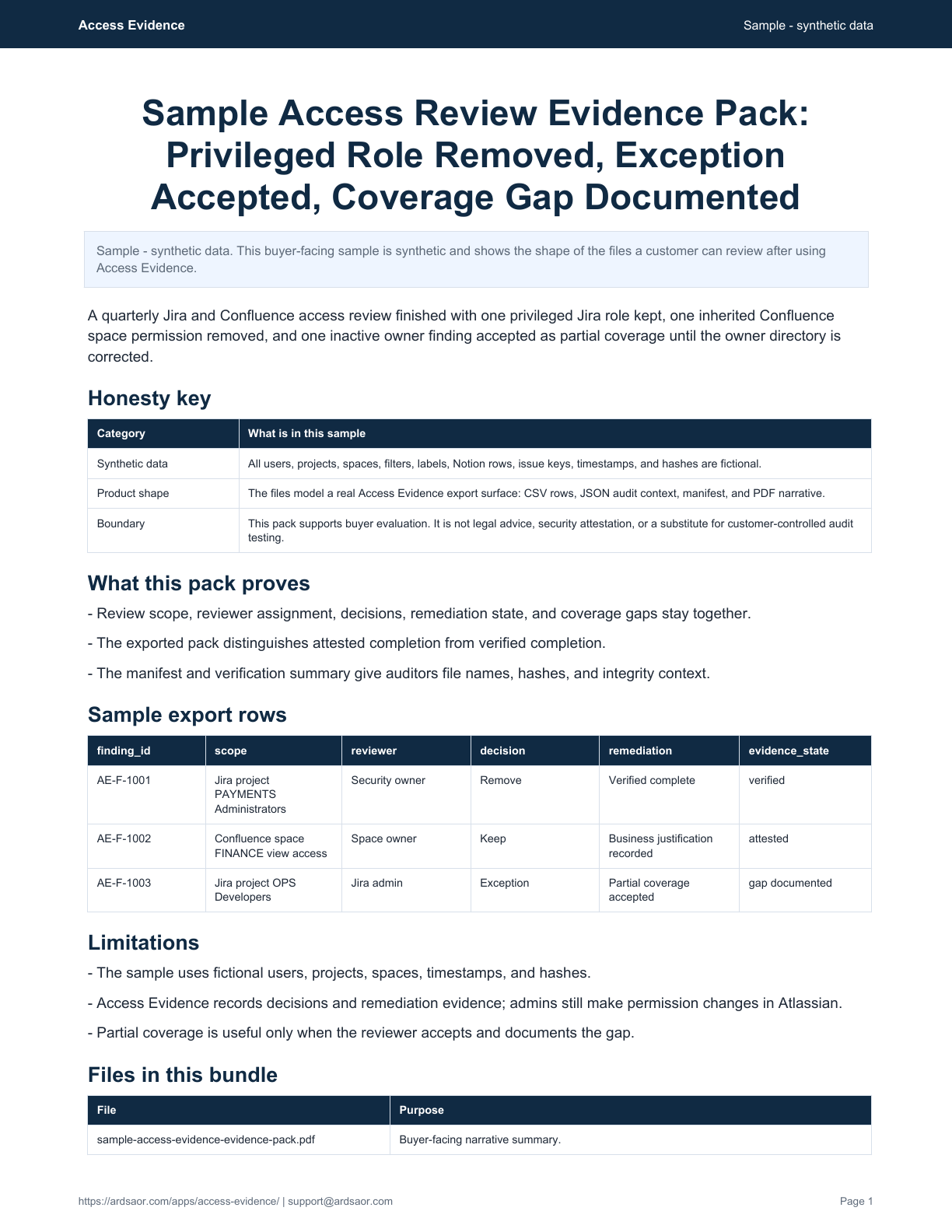
  • Evidence exports containing scope, findings, decisions, job receipts, and integrity metadata.
  • Permission drift monitoring and retained review history for audit support.

Typical workflow

  1. 1

    Scope the review

    Choose the Jira projects or Confluence spaces that need access verification.

  2. 2

    Generate findings

    Access Evidence scans selected scope and creates review findings.

  3. 3

    Assign reviewers

    Route review work to owners who can keep, remove, or exception access.

  4. 4

    Track remediation

    Record follow-up status and verification details until closure.

  5. 5

    Export evidence

    Package the review record for auditors or internal control testing.

Security, privacy, and support

  • Review configuration, findings, decisions, remediation state, and evidence metadata are stored in Forge app storage.
  • The app uses selected projects or spaces to narrow product-level Atlassian permissions in the workflow.
  • Evidence exports are generated from stored review records and integrity metadata.
  • Support and privacy documentation explain retention, deletion, and customer controls.

FAQ

Does Access Evidence change permissions automatically?

No. Admins and reviewers remain responsible for permission changes. The app records findings, decisions, remediation status, and evidence.

Can one review include Jira and Confluence?

The documented workflow treats each review as one product scope at a time. Create separate reviews when Jira projects and Confluence spaces both need review.

What goes into an evidence pack?

Evidence packs include review scope, findings, decisions, remediation records, job receipts, and integrity metadata.

Where is data stored?

Access Evidence stores app data in Atlassian Forge app storage and uses Atlassian-managed runtime infrastructure.

Related ArdSaor apps and solutions

AI Clearance screenshot from the Atlassian Marketplace listing showing approved AI tools, pending access requests, and governance log events in Jira.

AI tool access lifecycle

AI Clearance

Track AI requests, active grants, expiry reviews, and evidence in Jira Service Management.

Works with
Jira Cloud and Jira Service Management intake
Status
Available on Atlassian Marketplace for Jira Cloud
DriftGuard screenshot from the Atlassian Marketplace listing showing Jira board and filter drift monitoring.

Jira configuration drift

DriftGuard

Catch risky Jira board and saved-filter changes before teams lose trust.

Works with
Jira Cloud; board monitoring requires Jira Software
Status
Available on Atlassian Marketplace for Jira Cloud

Solution

AI Access Governance for Jira

AI-heavy teams and regulated or sensitive-data organizations often already use Jira Service Management as the internal request layer. AI Clearance adds the missing access lifecycle: admins approve AI tools into a requestable catalog, employees request one user access grant for one approved tool, and reviewers track purpose, duration, expiry, fulfillment, and evidence.

Explore this solution

Solution

Audit Evidence for Jira and Confluence Controls

Audit evidence is easier to trust when it comes from the workflow where the decision happened. ArdSaor apps preserve access review decisions, remediation status, AI access approvals, drift history, and supportable exports in Jira-native workflows.

Explore this solution