Scan result
Cleanup need, change impact, and action readiness stay separate across the accessible saved-filter corpus.

Filter Hygiene for evidence-led saved-filter cleanup
Filter Hygiene separates concrete cleanup need, supported change impact, and action readiness. Scan saved filters Jira makes accessible to the app, see direct Jira Software boards and incoming saved-filter references, and preflight owner, sharing, or deletion changes before Jira is modified.
Trials, purchase, billing, and exact pricing are handled on Atlassian Marketplace.
Built for Jira admins who need clear cleanup consequences—not another JQL results screen.
Last updated: 2026-07-11
Cleanup need, change impact, and action readiness stay separate across the accessible saved-filter corpus.
Direct Jira Software boards and incoming references from accessible saved-filter JQL are named when Jira supports the evidence.
Unknown, failed, permission-denied, and unavailable relationships stay visible. Zero supported results is not a safe-to-delete claim.


Jira exposes saved filters and JQL, but cleanup decisions are still scattered across ownership, sharing, validity, duplicate queries, downstream use, and direct edits. A filter that looks obsolete can still power a board or another saved filter.
Filter Hygiene puts cleanup evidence, supported impact, coverage limits, blockers, safest-next-action guidance, preflight, and exportable activity in one admin workflow.
| Need | Native or manual path | Filter Hygiene |
|---|---|---|
| Native JQL and filter search | Jira exposes queries and results, but not one cleanup decision record. | Filter Hygiene separates cleanup need, supported impact, and action readiness. |
| Dependency review | Admins check boards and dependent filters across separate surfaces. | Filter Hygiene names direct boards and incoming accessible saved-filter references, with explicit limits. |
| Direct edits | Changes can happen without a live impact record or exact restore check. | Preflight keeps owner/share changes reviewable and deletion one-at-a-time. |
| Ad hoc reporting | Managers or security reviewers get screenshots or partial exports. | CSV/Markdown exports preserve scan findings, coverage, decisions, and Recent Activity. |
Sample - demo walkthrough
A screenshot-led walkthrough using representative, production-verified Filter Hygiene UI and sanitized data to show cleanup triage, supported impact, coverage limits, one-filter delete preflight, Recent Activity, and supporting exports.
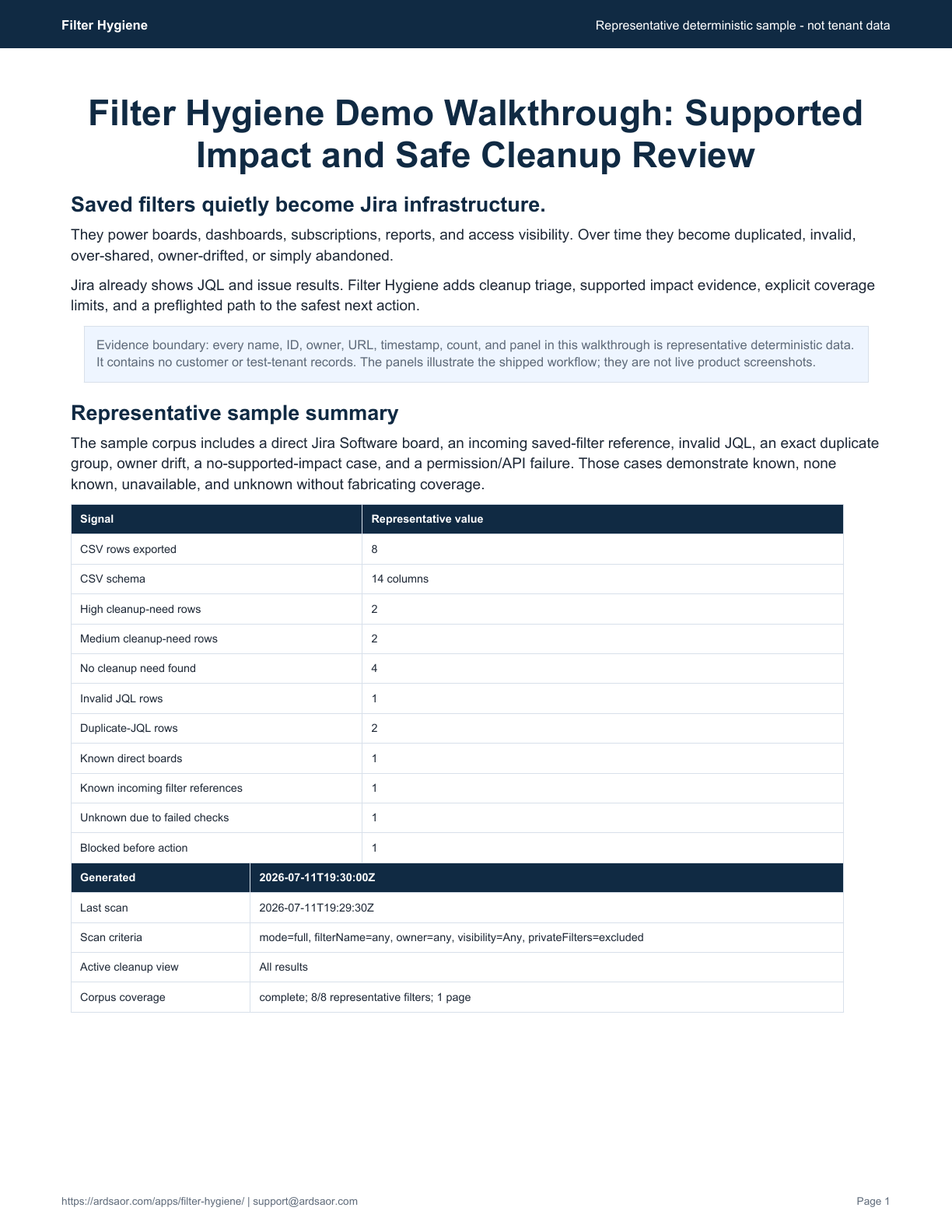
Best for: Jira admins who need clear cleanup consequences, supported dependency evidence, and guarded changes—not another JQL results screen.
Not for: A full Jira configuration-management, backup, migration, rollback, dashboard-management, or complete dependency-discovery suite.
Use Filter Hygiene when Jira already exposes the saved filters and JQL, but admins still need one defensible view of cleanup need, supported impact, coverage limits, and the safest next action.
Run a criteria scan or progressive Full scan and keep partial coverage visible.
Inspect concrete owner, sharing, JQL, duplicate, description, and available-use evidence.
Check direct boards and incoming saved-filter JQL references; keep unavailable and failed paths distinct.
Add reviewed filters to a controlled cleanup queue instead of changing Jira directly.
Check current owner, sharing, validity, supported dependencies, blockers, warnings, and undo eligibility before writes.
Keep CSV/Markdown evidence and Recent Activity for managers, security teams, or auditors.
Yes. Admins can delete exactly one reviewed filter after a repeated live impact preflight and typed DELETE confirmation. Deleted filters cannot be restored by Filter Hygiene.
The app checks direct Jira Software boards and incoming references from the accessible saved-filter corpus. Dashboard gadgets, JSM queues, standalone reports, automations, exports, subscriptions Jira does not return, and external consumers remain unavailable or unchecked.
No. Zero returned board or saved-filter relationships is not proof that a filter is unused or safe to delete. Unsupported and inaccessible relationships still require review.
Yes. Cleanup actions use live preflight so admins can review current evidence, blockers, warnings, and exact-undo eligibility before applying a write.
Recent Activity records who initiated actions, before and after owner or share summaries, deletion status, failures, and exportable CSV or Markdown reports.
No. Filter Hygiene cleans up saved filters. DriftGuard monitors selected board and filter configuration changes over time.
Install from Marketplace
Run a Full scan, turn concrete cleanup evidence into a staged action, and see what remains unknown before anything changes.

Jira configuration drift
Catch risky Jira board and saved-filter changes before sprints or reports run against the wrong configuration.

Jira label cleanup
Find duplicate Jira labels, preview safe merges, and keep cleanup undoable.
Solution
Jira admin work often fails in small places: over-shared filters, owner drift, label sprawl, and silent board changes. ArdSaor apps focus on these concrete cleanup and governance jobs with previews, audit records, and Forge-first architecture.